If a recipe is discontinued, you can remove it from your PLAATO Pro app to ensure it is no longer used when creating new batches.
⚠️Note: Once a recipe is removed, it cannot be recovered.
Plaato Pro Mobile App
-
Open the PLAATO Pro app and tap “Recipes.”
-
Select the recipe you want to remove.
-
Tap the pen icon in the top right corner.
-
Tap “Remove Recipe” to delete it.
Plaato Pro Web App
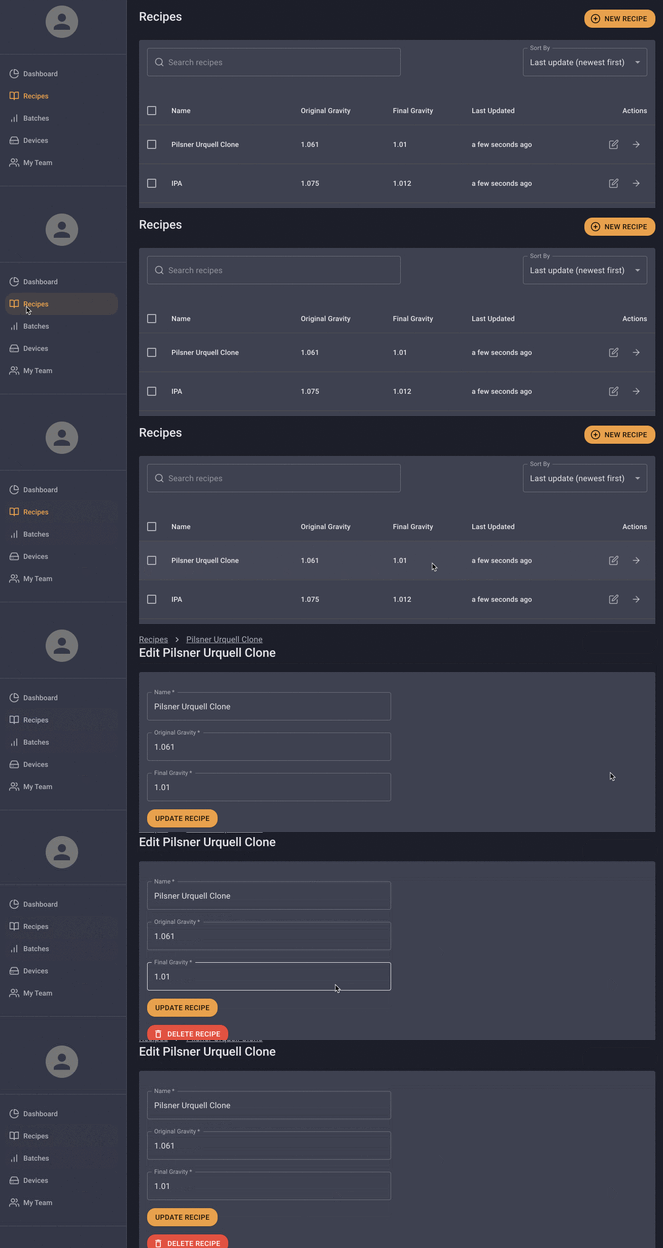
-
Log in to https://app.plaato.cloud/login.
-
Click on “Recipes” in the left navigation menu.
-
Click on the edit pen icon for the recipe you want to delete.
-
Scroll down to find the "Delete Recipe" option.
-
Click "Delete Recipe" to remove the recipe from your Plaato Pro App.