💡 The latest update from PLAATO is designed to automatically create batches for you, reducing the need for manual input and ensuring you capture every minute of fermentation data.👍
How does Automatic Batch Management work?
-
Liquid Detection
The PLAATO Pro monitors the fermenter continuously. When liquid is detected, the system recognizes this as the start of a new batch.
- Batch Creation
A batch is automatically generated and associated with the fermenter where the liquid was detected. The new batch will appear on your fermenter as new batch [start date].
-
User input
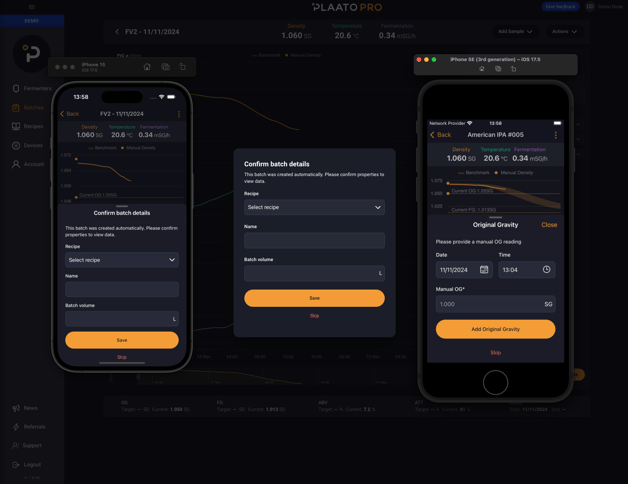
The first time the user enters the fermenter after an automatic batch was created they will be prompted to input recipe, name and volume of the batch.
-
Batch end
The batch is automatically ended by the system when the tank is emptied and the PLAATO Pro detects that it is in air.
What happens if I want to end my batch early?
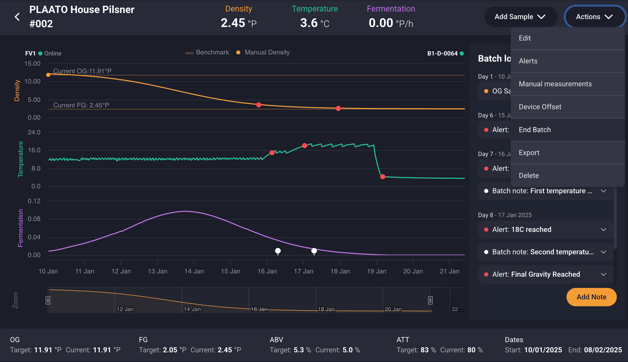
We recommend letting the batch run it's course to ensure accurate data collection. If you need to end your batch early, you may do so by opening the batch, select Actions and click End Batch.
Will this work with my CIP process?
Yes! The Automatic Batch Management has logic applied where any batch that is shorter than 2 hours will be removed.
If you have any questions or feedback regarding Automatic Batch Management - please reach out to us through the “Give feedback” button on web or through “Feedback” in the Account section on mobile. You can also reach out to our team via support@plaato.io