---
title: PLAATO Pro Hardware Installation Guide
description: PLAATO Pro hardware installation guide covering cleaning, installation requirements, alignment, Tri-Clamp compatibility, and approved adapters for accurate fermentation monitoring.
---
[Skip to content](https://help.plaato.ai/plaato-pro-hardware-installation-guide#main-content)
PLAATO
- [Home](https://plaato.io/)
- [App](https://app.plaato.cloud/)
Open main navigation
Close main navigation
- [Home](https://plaato.io/)
- [App](https://app.plaato.cloud/)
How can we help you?
- There are no suggestions because the search field is empty.
1. [PLAATO Knowledge Base](https://help.plaato.ai/?hsLang=en-us)
2. [PLAATO Pro](https://help.plaato.ai/plaato-pro?hsLang=en-us)
3. [PLAATO Sensor](https://help.plaato.ai/plaato-pro?hsLang=en-us#plaato-sensor)
# PLAATO Pro Hardware Installation Guide
## This guide will walk you through the installation requirements, how to install your PLAATO Pro, and cleaning recommendations.
### **Installation Requirements**
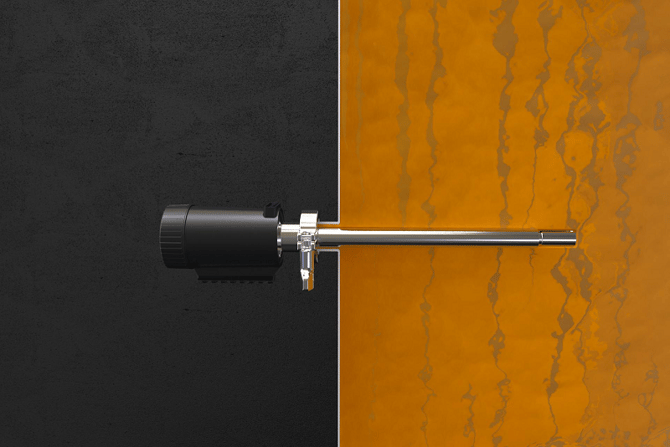
We recommend installing the PLAATO Pro in a spare 1.5” Tri-Clamp port on the fermenter.
The following criteria must be met when selecting a Tri-Clamp port for installation:
- The inner diameter of the port must be a minimum of 23 mm (0.9”).
- The device should be installed horizontally.
- To avoid interference from trub, the device should not be installed too close to the bottom of the fermenter.
- The probe must be fully submerged in liquid, with a minimum of 50 cm (20”) of liquid above it.
- The minimum distance from the probe tip to the inner wall of the fermenter should be 12 cm.
- The device must not be installed in a pipe, as gas pockets and particles may affect readings.
💡 Correct installation and use are essential to achieving the best possible results. Please carefully review the steps below.
---
### **How to Install Your PLAATO Pro on the Fermenter**
Ensure the PLAATO Pro is cleaned and sanitized before installation.
**1. Cleaning and Sanitizing**
a) Apply a caustic or oxidizing cleaning agent to the stainless steel parts.
b) Gently scrub the device using a sponge.
c) Rinse thoroughly with clean water.
d) Sanitize using acid, chlorine, or ethanol.
**2. Alignment**
Ensure the PLAATO Pro is correctly aligned.
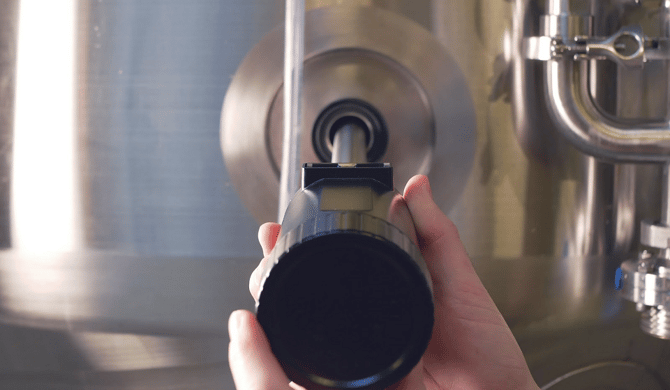
a) When installing the device in the fermenter, level the built-in spirit level to ensure the tines are properly positioned. This allows for the unimpeded passage of sediment and bubbles.
**3. Use of T-Connectors and Tri-Clamp Adapters**
a) T-Connectors
If only a single Tri-Clamp port is available on the fermenter and a sampling port is required, a T-connector may be installed between the PLAATO Pro and the fermenter.
⚠️ Only **T-connectors provided by PLAATO** should be used. Standard T-connectors may result in insufficient insertion depth and inaccurate specific gravity and temperature readings.
b) Adapters
Adapters may be used between the PLAATO Pro and the fermenter if a 1.5” Tri-Clamp port is not available.
**DIN11851 adapters available from PLAATO:**
- 1.5” TC – DN25
- 1.5” TC – DN32
- 1.5” TC – DN40
**Tri-Clamp adapter:**
- 1.5” TC – 2” TC\*
📝 \*TC-to-TC connectors are not provided by PLAATO but are available from most suppliers of sanitary connections.
---
If you experience any issues with adapters or connectors, please contact support@plaato.io
- [PLAATO Account & Setup](https://help.plaato.ai/plaato-account-setup?hsLang=en-us)
- [PLAATO Edge](https://help.plaato.ai/plaato-edge?hsLang=en-us#main-content)
- [Getting Started](https://help.plaato.ai/plaato-edge?hsLang=en-us#getting-started)
- [PLC Installation](https://help.plaato.ai/plaato-edge?hsLang=en-us#plc-installation)
- [PLAATO Pro](https://help.plaato.ai/plaato-pro?hsLang=en-us#main-content)
- [PLAATO App](https://help.plaato.ai/plaato-pro?hsLang=en-us#plaato-app)
- [PLAATO Sensor](https://help.plaato.ai/plaato-pro?hsLang=en-us#plaato-sensor)
- [FAQs](https://help.plaato.ai/faqs?hsLang=en-us#main-content)
- [Shipping](https://help.plaato.ai/faqs?hsLang=en-us#shipping)
- [Integrations & Partners](https://help.plaato.ai/integrations-partners?hsLang=en-us)
- [Troubleshooting](https://help.plaato.ai/troubleshooting?hsLang=en-us)
- [Home](https://plaato.io/)
- [App](https://app.plaato.cloud/)
# PLAATO
9C Brenneriveien Oslo.
[mailto:email@email.com](mailto:email@email.com)
Copyright © 2025, PLAATO