---
title: IDEC WinLDR installation instructions
description: Installation instructions for WinLDR and IDEC
---
[Skip to content](https://help.plaato.ai/idec-winldr-installation-instructions#main-content)
PLAATO
- [Home](https://plaato.io/)
- [App](https://app.plaato.cloud/)
Open main navigation
Close main navigation
- [Home](https://plaato.io/)
- [App](https://app.plaato.cloud/)
How can we help you?
- There are no suggestions because the search field is empty.
1. [PLAATO Knowledge Base](https://help.plaato.ai/?hsLang=en-us)
2. [PLAATO Edge](https://help.plaato.ai/plaato-edge?hsLang=en-us)
3. [PLC Installation](https://help.plaato.ai/plaato-edge?hsLang=en-us#plc-installation)
# IDEC WinLDR installation instructions
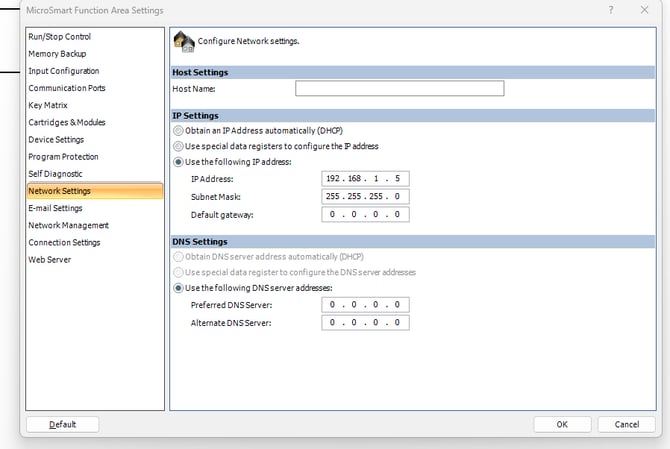
### Note IP Address of PLC
The IP Address can be found in the network settings tab. If this is not already set, give it an IP address that hasn't already been taken by the network. E.g. 192.168.1.5
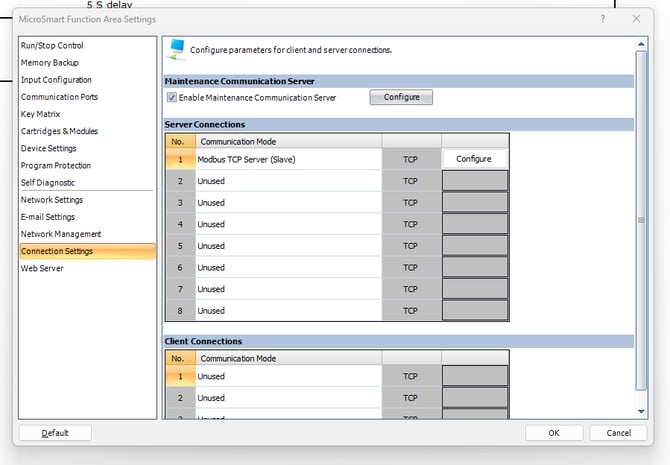
### Setup Modbus Server
Navigate to Connection Settings. Create a modbus TCP Server (Slave)
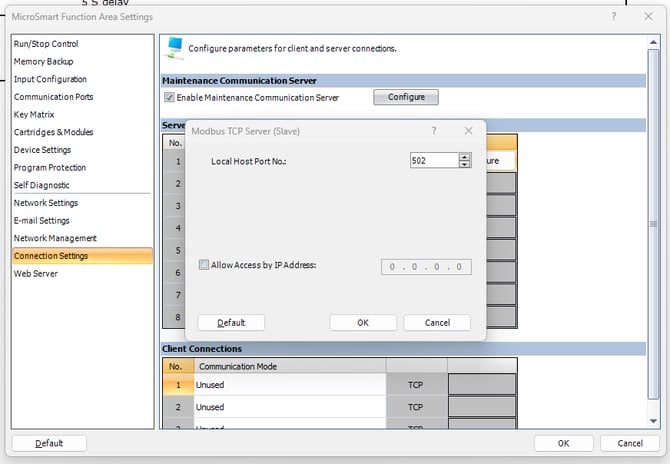
### Configure Modbus
The default settings will work for this. If the port number is different, let us know and we can set this on the PLAATO portal.
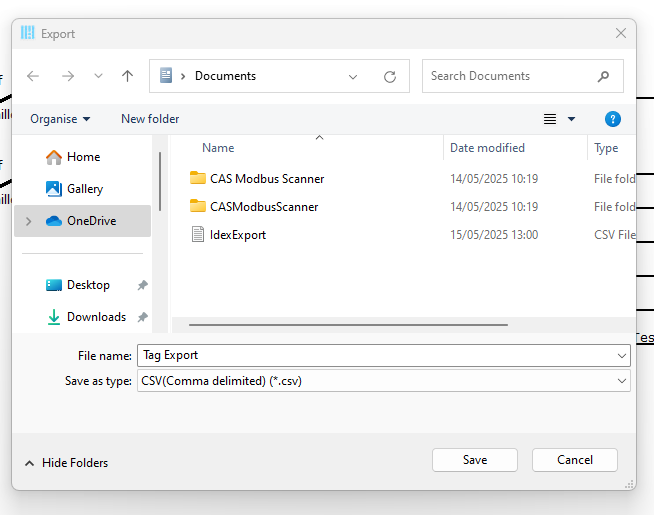
### Export the Tag values
- Navigate to the Tag Editor. Select "All Addresses" (or only the tags that you'd like to monitor).
- Press the export button (Ctrl+E)
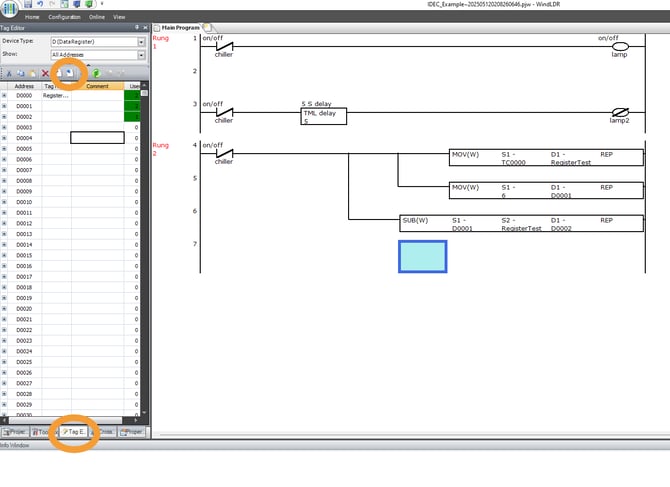
Then save the exported file and send it to support@plaato.io, or your customer success manager.
- [PLAATO Account & Setup](https://help.plaato.ai/plaato-account-setup?hsLang=en-us)
- [PLAATO Edge](https://help.plaato.ai/plaato-edge?hsLang=en-us#main-content)
- [Getting Started](https://help.plaato.ai/plaato-edge?hsLang=en-us#getting-started)
- [PLC Installation](https://help.plaato.ai/plaato-edge?hsLang=en-us#plc-installation)
- [PLAATO Pro](https://help.plaato.ai/plaato-pro?hsLang=en-us#main-content)
- [PLAATO App](https://help.plaato.ai/plaato-pro?hsLang=en-us#plaato-app)
- [PLAATO Sensor](https://help.plaato.ai/plaato-pro?hsLang=en-us#plaato-sensor)
- [FAQs](https://help.plaato.ai/faqs?hsLang=en-us#main-content)
- [Shipping](https://help.plaato.ai/faqs?hsLang=en-us#shipping)
- [Integrations & Partners](https://help.plaato.ai/integrations-partners?hsLang=en-us)
- [Troubleshooting](https://help.plaato.ai/troubleshooting?hsLang=en-us)
- [Home](https://plaato.io/)
- [App](https://app.plaato.cloud/)
# PLAATO
9C Brenneriveien Oslo.
[mailto:email@email.com](mailto:email@email.com)
Copyright © 2025, PLAATO