---
title: How to set your PLAATO Pro Preferences
description: How to setup preferences for units and how you brew in the plaato app
---
[Skip to content](https://help.plaato.ai/how-to-set-your-plaato-pro-preferences#main-content)
PLAATO
- [Home](https://plaato.io/)
- [App](https://app.plaato.cloud/)
Open main navigation
Close main navigation
- [Home](https://plaato.io/)
- [App](https://app.plaato.cloud/)
How can we help you?
- There are no suggestions because the search field is empty.
1. [PLAATO Knowledge Base](https://help.plaato.ai/?hsLang=en-us)
2. [PLAATO Pro](https://help.plaato.ai/plaato-pro?hsLang=en-us)
# How to set your PLAATO Pro Preferences
Ensure that the app is suited to your ways of working by customising and setting up your team and preferences.
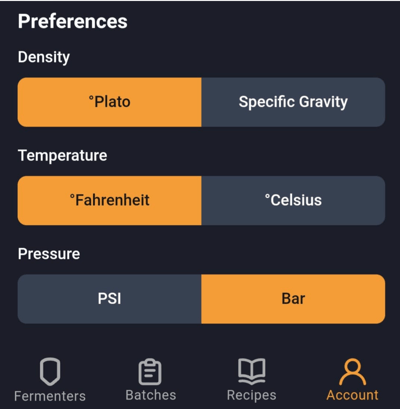
### Set your Temperature, Density and Pressure units
[](https://downloads.intercomcdn.com/i/o/1038265079/b501e2798f453c5d69e8200a/image.png?expires=1744799400&signature=a78c0e90d73a5eaaebb9bcd39b483a20155a6e25bc655f283b58b410b4ae4dfa&req=dSAkHst4mIFYUPMW1HO4zTEm6%2FC99g%2BoM7XT6YVi1SQcLpZ7HB1ApunxZ2Cr%0AUaMnRhZY%2BLdA3RexJFM%3D%0A)
- Launch your Plaato Pro App
- Tap **Account** \> **Preferences**. Select "**Celsius**" or "**Fahrenheit**"
- Tap **Account** \> **Preferences**. Select "**Plato**" or "**Specific Gravity**"
- Tap **Account** \> **Preferences.** Select **"PSI"** or **"Bar"**
### Rename your Device
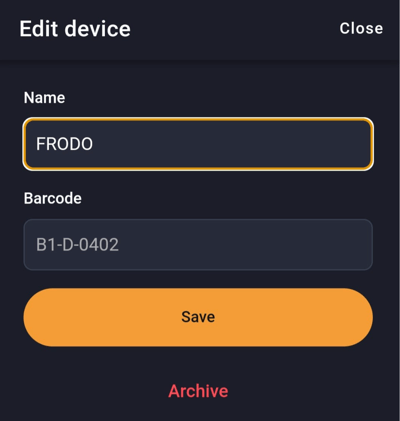
To personalise your Plaato Pro by giving them unique 🆒 names, follow these steps.
[](https://downloads.intercomcdn.com/i/o/1038264456/05c395114cdbaa0767cb52a9/image.png?expires=1744799400&signature=ff0d5e2fcd3f47b608e2773ddca50c065a27fb5b036774381d856ee41dfe0675&req=dSAkHst4mYVaX%2FMW1HO4zZpYYs%2ByLD5Qj2uBDprtJEYQ8vgwW%2BRis8Yu0xka%0AOVDvQ%2FoVOnJ4wKAui60%3D%0A)
- Launch your Plaato Pro App
- Tap **Account** \> **Devices**.
- Select the device you want to rename
- Tap in on the existing name field and enter the new name of the device.
- Tap on "**Save"**
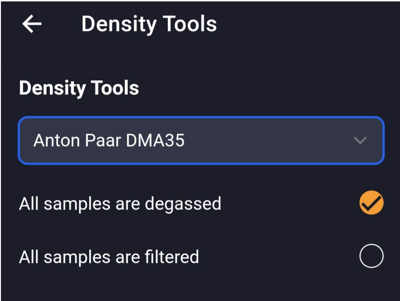
### Add your other Density Tools
[](https://downloads.intercomcdn.com/i/o/1038265885/1e309815cf939326e593e47a/image.png?expires=1744799400&signature=1f0b48ad5dac82d2b1b886921ca72c6f1245ab4cf0e81591ee7706cc0a0ed7cc&req=dSAkHst4mIlXXPMW1HO4zSH%2FUKT9RLr6pglqeP3I%2BO1MQKtNdMxdOdrfVah0%0AtXDIO2msrZrLjv7Syrc%3D%0A)
- Launch your Plaato Pro App
- Tap **Account** \> **Density Tools**.
- Select the correct density tool from the drop down menu.
- Select options for whether samples are **degassed** and **filtered.**
- [PLAATO Account & Setup](https://help.plaato.ai/plaato-account-setup?hsLang=en-us)
- [PLAATO Edge](https://help.plaato.ai/plaato-edge?hsLang=en-us#main-content)
- [Getting Started](https://help.plaato.ai/plaato-edge?hsLang=en-us#getting-started)
- [PLC Installation](https://help.plaato.ai/plaato-edge?hsLang=en-us#plc-installation)
- [PLAATO Pro](https://help.plaato.ai/plaato-pro?hsLang=en-us#main-content)
- [PLAATO App](https://help.plaato.ai/plaato-pro?hsLang=en-us#plaato-app)
- [PLAATO Sensor](https://help.plaato.ai/plaato-pro?hsLang=en-us#plaato-sensor)
- [FAQs](https://help.plaato.ai/faqs?hsLang=en-us#main-content)
- [Shipping](https://help.plaato.ai/faqs?hsLang=en-us#shipping)
- [Integrations & Partners](https://help.plaato.ai/integrations-partners?hsLang=en-us)
- [Troubleshooting](https://help.plaato.ai/troubleshooting?hsLang=en-us)
- [Home](https://plaato.io/)
- [App](https://app.plaato.cloud/)
# PLAATO
9C Brenneriveien Oslo.
[mailto:email@email.com](mailto:email@email.com)
Copyright © 2025, PLAATO